

Most Americans haven’t glanced at their Social Security statement online, which is a big oversight. It’s not hard to check; it only takes about 10 minutes. Yet, doing so is super important today. In 2026, knowing your Social Security number inside and out matters more than ever before.
Social Security Benefit Cuts 2032: The Social Security trust fund is projected to run out of money by the end of 2032. If that happens, benefits could be automatically cut by 24% across the board. That is roughly $500 less every month for the average retiree.
Before you can plan for that — or protect yourself from it — you need to know exactly what your monthly benefit is projected to be. And that starts with checking your Social Security statement.
This guide walks you through everything. Step by step. In plain, simple language. No tech skills needed.
Why Should You Check Your Social Security Statement Online Right Now?
Many people are surprised by this, but your Social Security statement is super important. It’s way more than just a note on when you can retire; it’s a key free resource you can always check out for vital financial info.
Inside your statement, you will find your estimated monthly retirement benefit, your full earnings history going back decades, and information about disability and survivors benefits for your family.
But here is the thing that makes checking it urgent right now.
In less than seven years, the Social Security trust fund will be insolvent by 2032. The Committee for a Responsible Federal Budget warns that without congressional action, benefits could plummet by 24%. This would hit every retiree hard, across all states.
That means the numbers on your statement today could look very different by 2032. And the only way to plan for that gap — and protect your retirement — is to know your numbers right now.
4 Powerful Reasons to Check Your Statement Today
| Reason | Why It Matters |
| Know your estimated monthly benefit | Plan your retirement budget with real numbers |
| Spot errors in your earnings record | Mistakes can quietly reduce your benefit for life |
| Understand your 2032 cut exposure | Calculate what a 24% cut would mean for you personally |
| Plan for the right time to retire | See how claiming at 62, 67, or 70 differs. |
If you haven’t checked your statement lately, today’s the perfect day to start.
What Is the Social Security Statement and What Does It Show?
Before we walk through the steps, let’s quickly cover what the Social Security statement actually is — because a lot of people are not sure.
Your Social Security statement is an official document from the Social Security Administration (SSA). It is a personalized summary of your entire Social Security record. Think of it as your retirement report card.
It shows you four key things in plain numbers.
What Your Social Security Statement Contains
| Section | What It Shows You |
| Estimated retirement benefits | Your projected monthly payment at age 62, 67, and 70 |
| Earnings history | Every year of recorded income since you started working |
| Disability benefit estimate | What you would receive if you became disabled before retirement |
| Survivors benefit information | What your spouse or dependents could receive if you passed away |
Each of these sections gives you real, useful information. But for most people reading this guide, the two most important sections are the estimated retirement benefits and the earnings history.
The earnings history is especially worth checking carefully. Every dollar of income you ever earned — and paid Social Security taxes on — should appear in that record. If a year is missing or shows the wrong amount, your benefit could be lower than it should be. And most people never catch it because they never look.
What You Need Before You Start — A Simple Checklist
Good news—you don’t need much to begin. Just gather what you need and dive in.
Before checking, make sure you have:
- Social Security card
- Driver’s license
- Recent tax returns
Sitting down to look over your info can give you big insights. Plus, being prepared makes the process way easier.
Your Pre-Login Checklist
| What You Need | Details |
| A device with internet | Phone, tablet, laptop, or desktop computer all work fine |
| Your Social Security number | The 9-digit number on your Social Security card |
| A valid email address | Used to create and access your account |
| A US mailing address | Must match what SSA has on file for you |
| Government-issued ID details | Driver’s licence or passport info may be needed for verification |
| A phone number | For two-factor authentication during login |
That is genuinely all you need. Most people have all of this ready in about two minutes. Once you have these things in front of you, you are ready to go.
How to
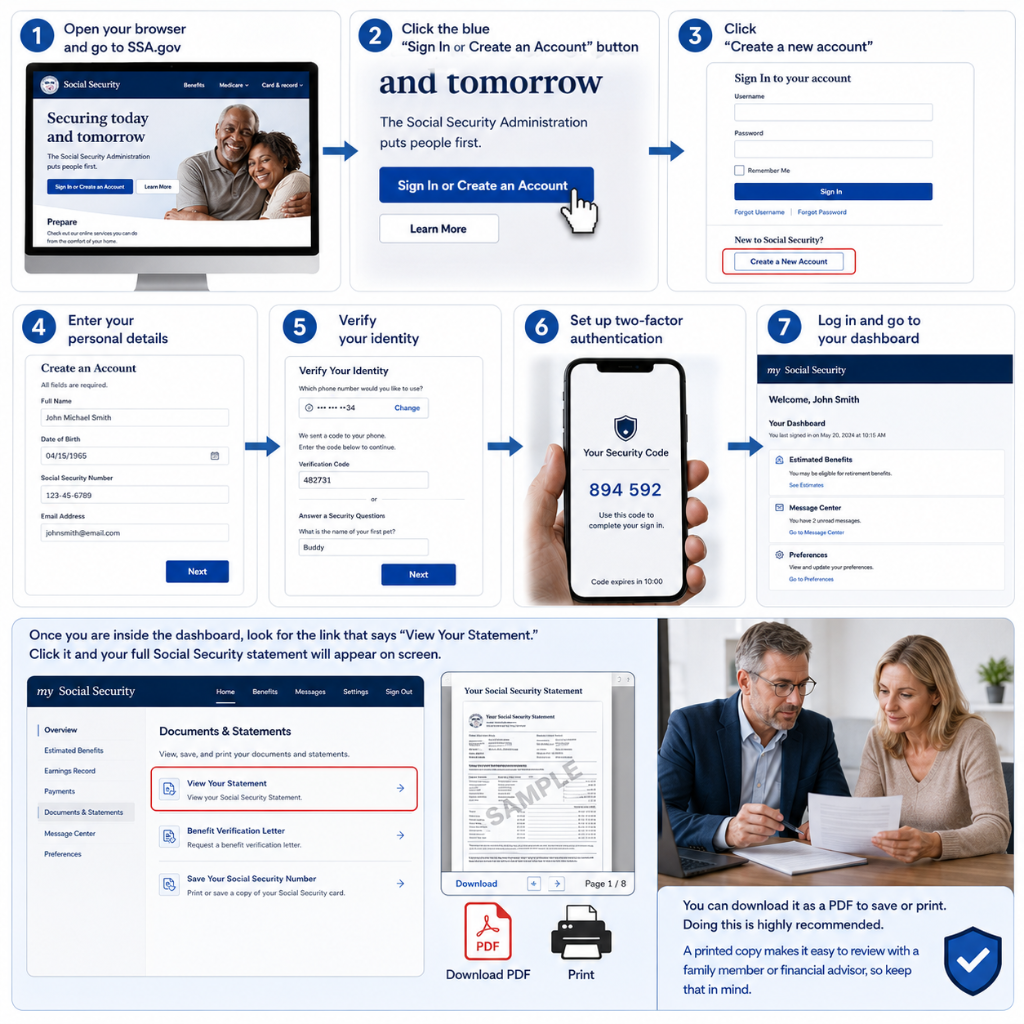
Now let’s get into the actual process. To check your Social Security statement online, you need to create a free account on the official SSA website. This is called a “my Social Security” account.
It sounds more complicated than it is. Follow these steps exactly, and you will be inside your account in under 10 minutes.
Step-by-Step Account Creation Guide
| Step | What to Do | What to Expect |
| Step 1 | Open your browser and go to SSA.gov | The official Social Security Administration homepage loads |
| Step 2 | Click the blue “Sign In or Create an Account” button | You will be taken to the my Social Security login page |
| Step 3 | Click “Create a new account” | You will be asked to choose a verification method |
| Step 4 | Enter your personal details | Full name, date of birth, Social Security number, email address |
| Step 5 | Verify your identity | SSA will ask you security questions or send a code to your phone |
| Step 6 | Set up two-factor authentication | A code is sent to your phone every time you log in — this keeps your account safe |
| Step 7 | Log in and go to your dashboard | Your my Social Security account is now active and ready |
Once you are inside the dashboard, look for the link that says “View Your Statement.” Click it and your full Social Security statement will appear on screen.
You can download it as a PDF to save or print. Doing this is highly recommended. A printed copy makes it easy to review with a family member or financial advisor, so keep that in mind.
How to Find and Read Your Social Security Statement
Logging in is just the start; finding your statement is easy after that. Reading it might seem confusing at first, though, so let’s go over it together.
Your statement is divided into clear sections. Here is a simple guide to each one.
How to Navigate Your Social Security Statement
| Section | Where to Find It | What to Do With It |
| Estimated benefits | Top section of the statement | Note your benefit amounts at age 62, 67, and 70 |
| Earnings record | Scrolling down through the statement | Check every year carefully for errors or missing income |
| Medicare information | Near the bottom | Understand when you become eligible at age 65 |
| Disability benefit | Middle section | Good to know — especially if you are still working |
| Download option | Top right of the page | Save as PDF for your personal records |
The most important number on your statement is your estimated monthly benefit at your full retirement age — which for most people reading this is age 67.
Write that number down. Or screenshot it. Because in the next section, we are going to show you exactly how to use it to calculate what a 2032 benefit cut would mean for you personally.
How to Read Your Earnings Record, And Why Errors Are More Common Than You Think
This section of your statement deserves its own spotlight. Because a surprising number of Americans have errors in their earnings record — and most of them never know it.
Your earnings record lists every single year you have worked and the income that was recorded for Social Security purposes. It goes all the way back to your very first job.
Here is why errors happen and what to look for.
Common Earnings Record Errors and What Causes Them
| Type of Error | Common Cause | How It Affects You |
| Missing year of income | Employer reported under wrong name or SSN | That year’s earnings not counted toward your benefit |
| Wrong income amount listed | Payroll error by employer | Your benefit calculation comes out lower than it should |
| Years showing zero income | Self-employment taxes not filed correctly | Gaps in your record reduce your average lifetime earnings |
| Name mismatch | Marriage, divorce, or legal name change not updated | Records may not match — causing missing entries |
| Recent year not yet showing | SSA processing delays | Usually resolves within 12 to 18 months |
If you spot any error — even a small one — it is worth fixing. A missing year of income or a wrong amount can quietly reduce your monthly benefit by more than you might expect.
Here is how to request a correction:
Go to SSA.gov and look for the section on correcting your earnings record. You will need to provide proof — such as W-2 forms, tax returns, or pay stubs from the year in question. The SSA will review it and update your record if the evidence supports your claim.
It is a little bit of paperwork. But it could mean meaningfully more money every month for the rest of your retirement.
What Your Estimated Benefit Numbers Actually Mean
This is the part most people skip over — and they really should not.
Your statement gives you three different estimated monthly benefit amounts. Each one corresponds to a different age at which you could start claiming your benefits. Understanding the difference between these three numbers is one of the most valuable things you can do for your retirement planning.
Understanding Your Numbers When You Check Social Security Statement Online
Your Three Benefit Estimates Explained
| Retirement Age | What It Means | The Trade-Off |
| Age 62 — Early retirement | You can start collecting as soon as 62 | Your monthly benefit is permanently reduced by up to 30% |
| Age 67 — Full retirement age | This is your standard full benefit amount | No reduction, no bonus — just your full earned benefit |
| Age 70 — Delayed retirement | Every year you wait past 67 adds roughly 8% to your benefit | Maximum monthly amount — but you collect for fewer years |
If you plan to receive $1,800 a month from age 67, holding off or rushing has big effects. Opting for Social Security at 62 cuts it to roughly $1,260. Waiting until 70 bumps it up to about $2,232. So, there’s a huge swing based on when you choose to start.
Choosing to claim early can slash your payments by nearly $600 a month. Conversely, waiting lets you gain almost $400 more than the initial estimate. This works out to a big difference over 20 years – it really adds up.
But here is something important to layer on top of those numbers in 2032. A 24% automatic benefit cut could kick in by the end of 2032 if the trust fund runs dry.
That means your $1,800 monthly benefit could become $1,368 per month after the cut. Your $2,232 delayed benefit could drop to $1,696.
Knowing these numbers now gives you the chance to plan around them — rather than being shocked by them later.
How a 24% Cut Changes Your Benefit Estimate
| Your Current Estimate | After a 24% Cut | Monthly Loss |
| $1,200/month | $912/month | -$288/month |
| $1,500/month | $1,140/month | -$360/month |
| $1,800/month | $1,368/month | -$432/month |
| $2,100/month | $1,596/month | -$504/month |
| $2,400/month | $1,824/month | -$576/month |
Based on projected 24% automatic cut at trust fund insolvency. Source: CRFB — No State Spared Report, June 2026
This table alone is reason enough to check your statement today. You cannot plan for what you do not know.
Common Problems When Creating an Account, And How to Fix Them
Sometimes the account creation process hits a snag. Do not worry — it happens to a lot of people, and every problem has a straightforward solution.
Troubleshooting Your my Social Security Account
| Problem | Why It Happens | How to Fix It |
| “Identity verification failed” | Information entered does not match SSA records exactly | Double-check spelling of name, exact date of birth, and SSN |
| “My information doesn’t match” | Address or name may be outdated in SSA system | Call SSA at 1-800-772-1213 to update your records first |
| Phone verification not working | Wrong number on file or no mobile phone access | Choose email verification instead or request a mailed code |
| Account already exists | Someone may have created an account previously | Use the “Forgot username/password” option to recover access |
| Website not loading correctly | Browser compatibility issue | Try a different browser — Chrome or Firefox work well |
| Need in-person help | Complex identity verification issue | Visit your local SSA office with two forms of photo ID |
The most common issue people run into is the identity verification step. The SSA needs to confirm you are who you say you are — which is actually a good thing. It protects your account from fraud. If you hit a wall here, the phone number 1-800-772-1213 connects you directly to an SSA representative who can help.
Smart Things to Do After Checking Your Statement
Checking your statement is the first step. But what you do with that information matters just as much. Here are five smart moves to make right after you review your statement.
Your Post-Statement Action Plan
| Action | Why It Matters | How to Do It |
| Save or print your statement | Keeps a record for future comparison and financial planning | Use the download PDF option inside your account |
| Note your full retirement age benefit | This is your planning baseline number | Write it down or screenshot it |
| Calculate your 2032 cut scenario | Understand your real worst-case monthly income | Multiply your benefit by 0.76 — see our Social Security Benefit Cuts 2032 guide |
| Share with a spouse or family member | Retirement planning affects the whole household | Review it together and discuss your combined income picture |
| Set a calendar reminder to check again | Your benefit estimate updates as you earn more | Check once every 12 months — ideally around the same time each year |
That last point is worth emphasising. Your Social Security statement is not a set-it-and-forget-it document. It updates every year based on your most recent earnings. If you had a good earning year, your estimated benefit may go up. If an error crept into your record, you want to catch it early.
Make it a once-a-year habit. It takes less than 10 minutes, and it could be one of the most valuable financial reviews you do all year.
The Bottom Line
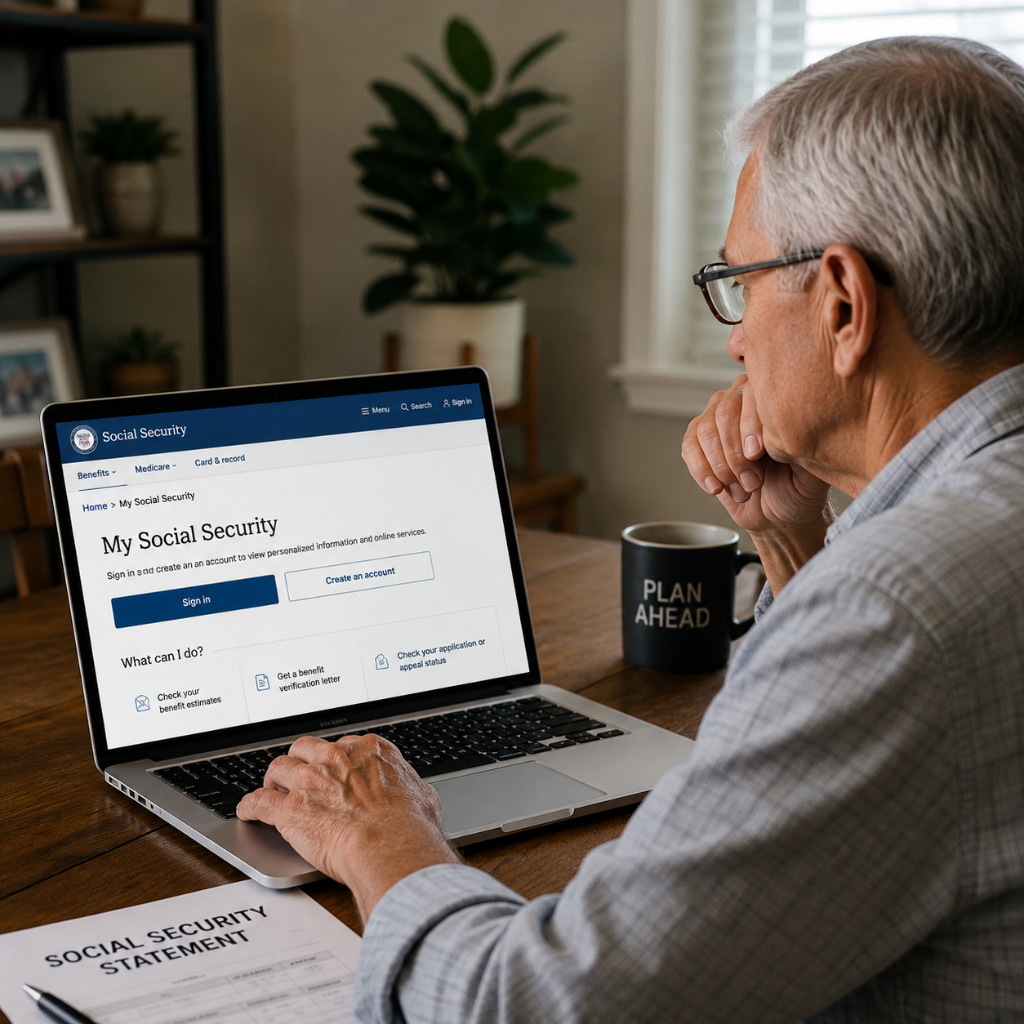
Checking your Social Security statement online is super easy and really helpful for your retirement future. It only takes about 10 minutes. It is completely free. And the information inside it — your estimated monthly benefit, your earnings history, your retirement age options — gives you a clear picture of exactly where you stand.
Once you know how to check Social Security statements online, you can take that number and do something genuinely useful with it. Calculate your 2032 cut scenario. Decide whether to claim early or wait. Spot any errors that could be quietly costing you money.
Because the one thing you absolutely cannot do is plan a secure retirement around numbers you have never actually looked at.
Go to SSA.gov today. Create your free account. Check your statement. This statement breaks down how your numbers might change if Congress doesn’t make any moves by 2032. Knowing those figures is the first important step. Planning around them is the second. And the time to start both is right now.
✅ You checked your statement. Now check your payment date.
Your June 2026 Social Security payment does not arrive on the same day for everyone. It is tied to your birthday. Find your exact Wednesday — and what to do if the money is late.
Disclaimer
This article is for general informational purposes only and does not constitute financial, legal, or retirement planning advice. Benefit estimates, payment amounts, and projected figures – including the potential 24% benefit reduction by 2032, are based on publicly available data and third-party reports and may change due to future legislation or SSA policy updates. Always verify your details at SSA.gov or call 1-800-772-1213. For personalized guidance, consult a licensed financial advisor.